
Data and file types
Starsector has many different file formats that you should know about.
Before you continue reading, if you are using Windows, make sure to open the section below.
Windows File Extensions
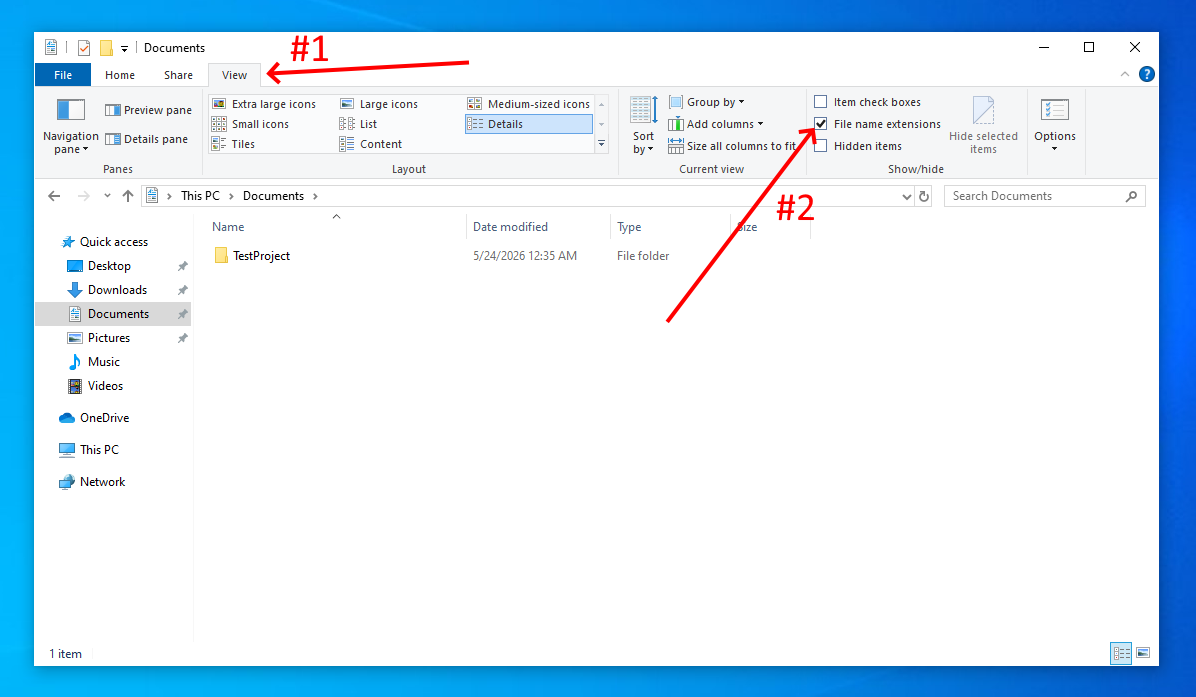
Windows by default does not have "File name extensions" active. File extensions tell you what kind of file you are working with, like .png for images or .json for configuration files. Not having them can make finding the right files more difficult than it needs to be.
To fix this, open your File Explorer, click on View and check File Name Extensions to turn the feature on.
.json
JSON stands for Javascript Object Notation. It is a format that originally comes from the Javascript programming language. Contrary to what you may think, Javascript has nothing to do with Java, the programming language you use for Starsector. However, this format itself has become very common in most environments.
Starsector uses it a lot. You will find many files with the .json extension, notably settings.json, which is Starsector's biggest configuration file. There are other files though that use the .json format as well, but just have a different file extension. Those are .ship, .skin, .variant, .system, .wpn, .proj and .faction.
JSON is a format that maps keys to values. It is worth noting that Starsector uses a custom version of JSON that works slightly differently from the original. Overall, Starsector's version of it is more lax about comma placement and allows # to be used to write comments into the files without breaking them. Below you can see an example json, taken from afflictor_Strike.variant.
{
    "displayName": "Strike", #The # allows this line to be commented into the file without breaking anything.
    "fluxCapacitors": 10,
    "fluxVents": 7,
    "goalVariant": true,
    "hullId": "afflictor",
    "hullMods": [
        "hardened_subsystems",
        "fluxcoil"
    ],
    "permaMods": [],
    "sMods": [],
    "variantId": "afflictor_Strike",
    "weaponGroups": [
        {
            "autofire": false,
            "mode": "ALTERNATING",
            "weapons": {
                "WS 002": "amblaster",
                "WS 003": "amblaster"
            }
        },
        {
            "autofire": false,
            "mode": "ALTERNATING",
            "weapons": {
                "WS 001": "sabot",
                "WS 004": "sabot"
            }
        },
        {
            "autofire": true,
            "mode": "LINKED",
            "weapons": {"WS 006": "pdlaser"}
        }
    ]
}
As you can see, each key (i.e "displayName") is followed by a colon : which separates it from its value i.e "Strike". You will also notice that there are many different types of values. You have text values ("Strike"), numerical values (10) and true/false values (true).
Following those you have Lists which are marked by a starting [ and closing ]. Lists hold multiple values that are separated by commas.
Lastly you have Objects. Objects are marked by a starting { and closing }, and are themselves just nested JSON. The game often expects a specific form for objects. For example, in .variant files, Starsector expects weaponGroups to hold a list of objects that each have a shape like this:
{
    "autofire": false,
    "mode": "ALTERNATING",
    "weapons": {
        "WS 001": "sabot",
        "WS 004": "sabot"
    }
}
As you can see, even this has another nested object on the "weapons" key.
.csv
CSV stands for comma-separated-values. It is a format that depicts tables of data. Starsector uses this format just as much as it uses the .json format.
While it is technically possible to modify with just a text editor, since the real data is stored as a long list of comma separated values in text form, you really should use a program for it as described on the required tools page.
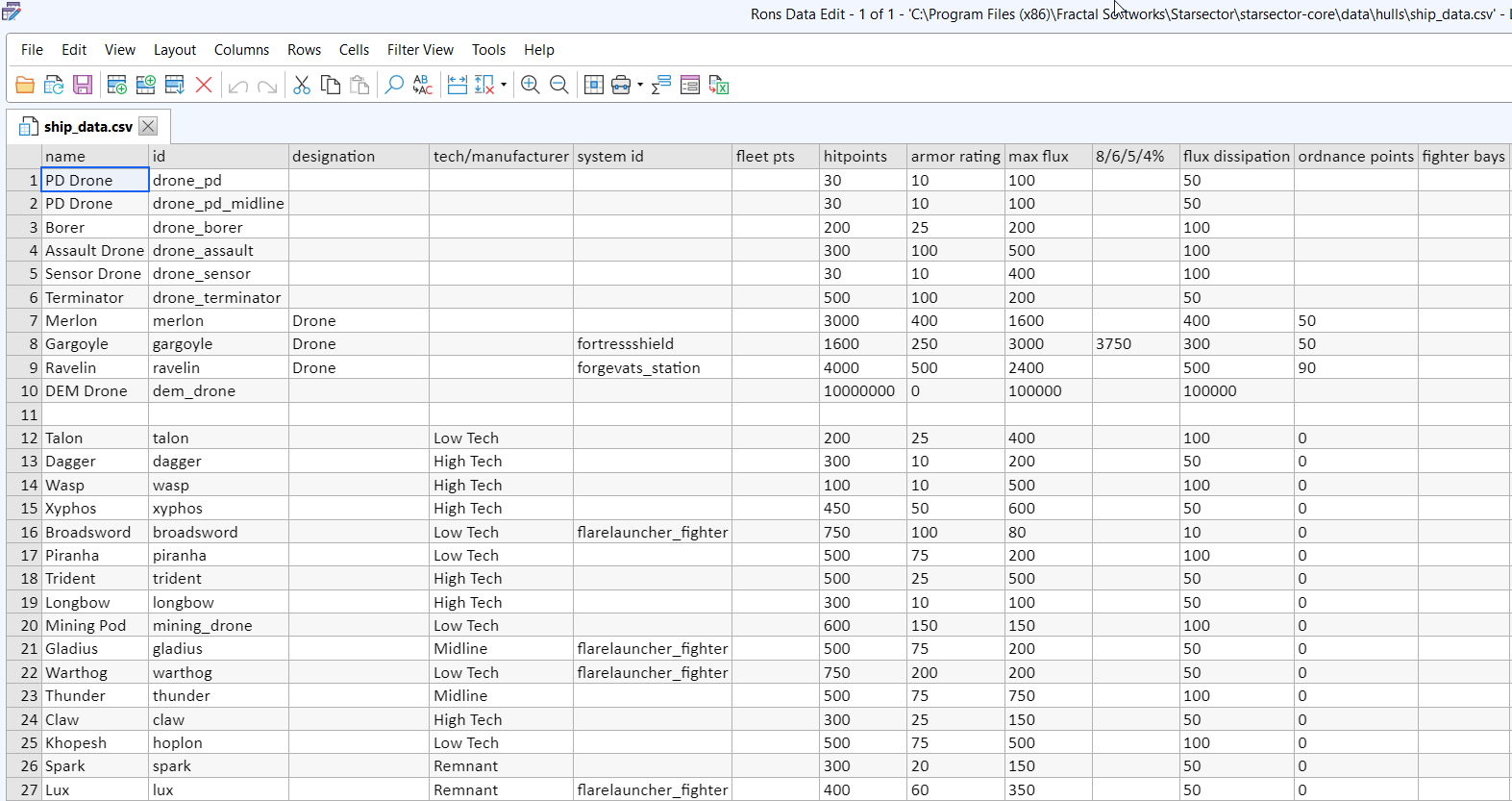
When loading CSVs, Starsector will ignore blank lines and lines where the first cell in a column starts with #.
.png & .jpg
Starsector uses the .png and .jpg file types for images. You can edit those with almost any image editor that supports transparency. There is not a lot of technical know-how required for those file types, but there is a common issue that can sometimes occur with .png files. When you save your file, many image editors will ask you what Bit Depth (also often called Color Depth) you want to save your image with.
For Starsector, this should always be 32bit. If your image looks very messed up and much more red ingame, then it is likely because of this mistake. Some image editors may automatically set the bit depth lower than 32bit, in cases where it would technically make sense for file-size savings, but the other formats simply do not work in Starsector.
How to set the bit depth differs between editors, but here is an example of where to change it in Paint.net when saving your file:
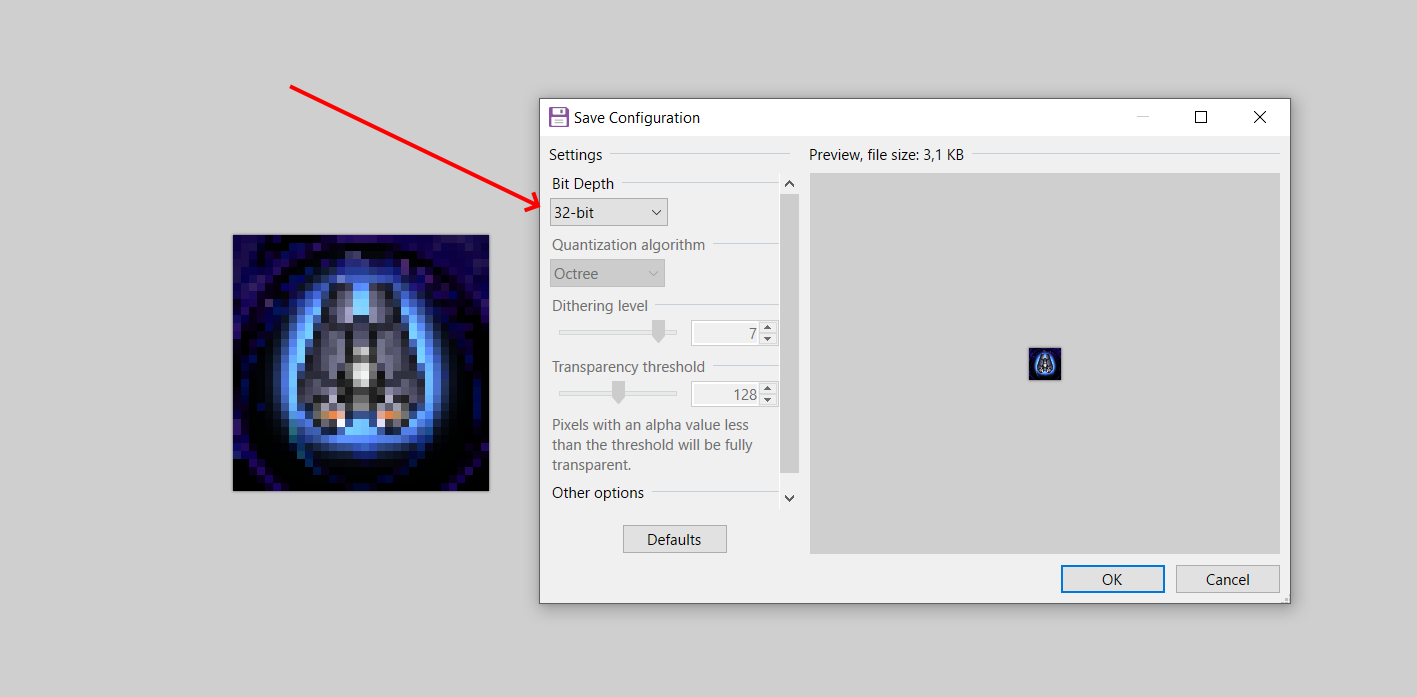
In some image editors the bit depth may be mentioned in a different format, which is "bits per channel". In that case, 8 bits per channel is the correct unit.
.java
Those files contain Java code. Java code is generally found within your mod's src folder. You should open those files with a dedicated IDE.
More details on Java itself can be found in the Getting started with Java guide.