
Community Modding Tools
This page dedicated to highlight multitude of tools created by fellow mod authors in order of making our lifes easier.
Use right side bar for fast navigation.
Ship Editors
Ship editors is here to greatly simplify convoluted proces of editing .ship files and can help with ship_data.csv entries.
Curently there two ship editors:
- Trylobot's Ship&Weapon Editor (fork of older Deafly Ship&Weapon Editor) and
- thevolkflower's Starsector Ship Maker (continuation of Ship Editor by Ontheheavens)
Both of them functional even if Ship&Weapon Editor not maintained. Generally S&W editor more popular due to old guide on wiki.gg (Intro to modding), but hopefully it get evened out with more information here and feature development by thevolkflower.
Lets explore them more in details.
Ship&Weapon Editor
//Picture of editor here, may relink forum image for now

Ship&Weapon Editor - Forum page (newest 0.98a Fork by IceFire)
Dedicated guide/tutorial here (as there nothing better yet on Academy itself, link to Intro to modding)
Ship&Weapon Editor allows to edit ships, variants and weapons. It simple but tricky in places. Latest fork should have fixed adding modules, and likely other bugs. Also it supports editing only of one ship or weapon at the time compared to Starsector Ship Maker.
Setup
Editor comes with exe file. There nothing to setup. Unpack zip you downloaded somewhere you can get to easily, lauch exe and it should work. There more things you can do with sf-ship-ed-settings.json which comes with tool but that out of scope of this page.
Starsector Ship Editor/Ship Maker
//Picture of editor here, may relink forum image for now
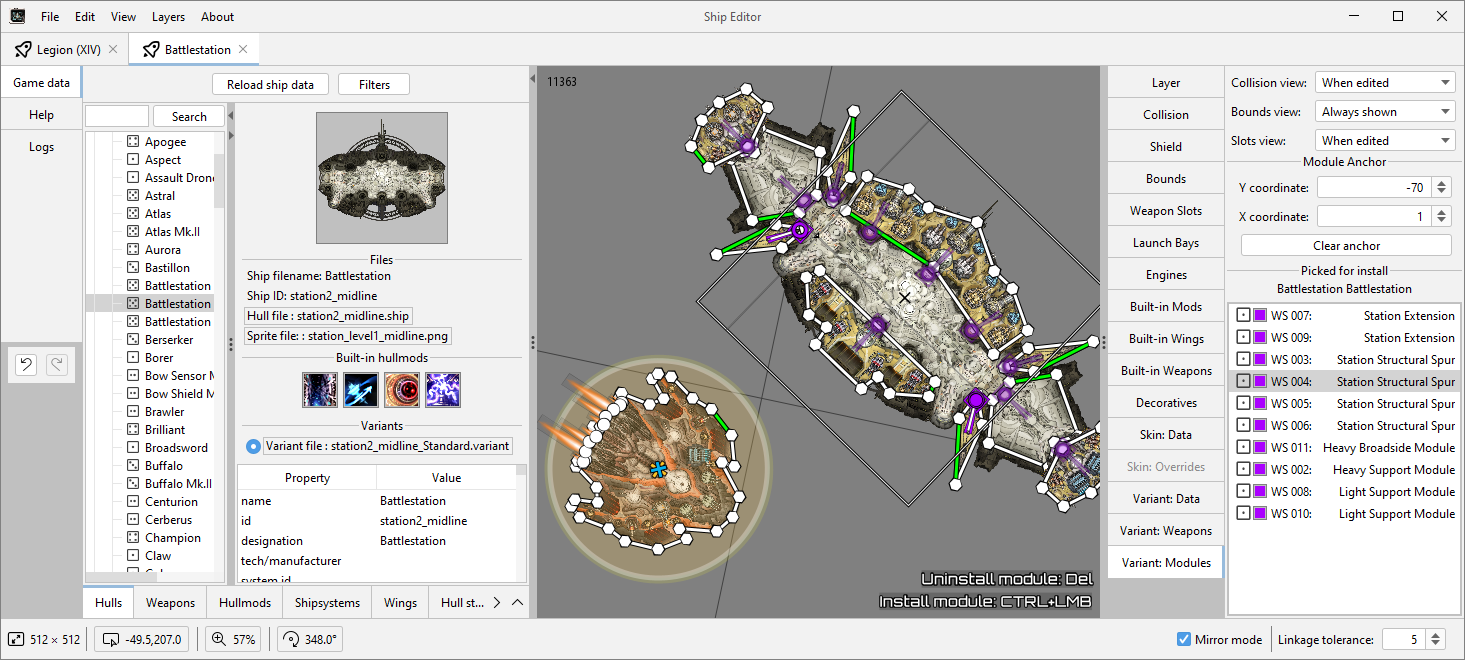
Ship Editor by Ontheheavens is more modern take on similar idea. It provides more detailed visual interface and somewhat more capabilities (like ability to edit multiple ships in one app instance). It also bit more stable in some cases. Main downsides of using it is what UI needs to be navigated without tutorials available and it generally less popular among older mod authors.
At the moment there also continuation of Ship Editor by thevolkflower. They aim to add more features and genereally improve on original, but their version less stable at the moment.
Ship Editor by Ontheheavens - Forum page
Starsector Ship Maker by thevolkflower (WIP) - Forum page
Dedicated guide/tutorial here (none in time of writing)
Setup
- Download and install Java 21 SDK (For me using JDK from official Oracle site worked: JDK Java SE Development Kit 21.0.11
- Download editor files from forum page (or .zip from github if you want to use thevolkflower's version)
- Unpack zip.
- Run Ship Editor.exe (or ship_editor.bat if you want to use thevolkflower's version)
- If everything works, UI will load and you can stat using the editor.
Ship Catalogue / Variant Editor

Ship Catalogue / Variant Editor - Forum Page
Ship Catalogue / Variant Editor is mod which deserves special mention as it can serve as separate tool to edit and save variants in all familiar in game interface. Besides that it also has many additional features including mission listing variants with common issues.
SRT Refurbished - Rules.csv Editor

SRT Refurbished is editor for rules.csv from Purple Nebula based on SafariJohn's Rules Tool. It provides proper interface and structure to editing rules.csv removing a lot of friction from editing csv.
Quickfire mod names and pages:
General use
-
Console Commands mod adds actual console command panel in the game with a lot of functionality.
-
Additional Console Commands mod adds even more commands for Console Commands mod.
-
AI Flag Tool adds side field displaying AI flags in combat, useful for debuging weird AI behaviours.
-
Speed Up adds ways to speed up combat and campaign. Usefull as there many reason you'd find to speed through things while testing.
-
Log Viewer adds another way to view logs. Useful for debuging without running Intelij debug.
-
Vexlia's Faster DevStart adds way to shortcut game restart so frequent in modding with some additional options.
-
Lunalib's Debug Panel (press F4 in campaign) is visual implementation of some console commands. Have simpler search and shows sprites where possible.
Ship/Fleet balancing and testing
-
A Fleet Testing Mod adds multiple features to help with combat testing.
-
Detailed Combat Results provides comprehencive overview of fleet's combat performance.
-
Too Much Information and many its submods help to get grasp on how ship and weapon stats affected by different moddifiers.
-
FleetBuilder is another mod to test builds and fleet composition. Offers few nice features to set up custom battles and move fleet netween saves.