
Required Tools
Modding Starsector requires an assortment of different editors. Each one is of use for different types of file formats. Before continuing with any other guide, you should set up at least one editor from each section mentioned here.
Integrated Development Environment (IDE)
An IDE is an editor for code. It comes with many important features. These range from code-completion to live error highlighting and much more. While you can technically edit code without one, doing so will be much more tedious. In Starsector's context, you will use it mainly to modify .java files.
The most widely used IDE in the community is IntelliJ IDEA, an IDE specifically made for Java (and Kotlin) code. This guide and many others will assume that you are using it, so you should install it as well.
Download
After downloading it, run the file to start the installation process.
IntelliJ IDEA has both a free version and a paid version. You do not need the paid version for anything Starsector related. The "Free Trial" refers to a 30-day free trial of the paid version, not that access to the free version lasts only 30 days.
Text Editor
Starsector has many configuration files (.json, .ship, .variant, etc.). These require plain text editors, but the basic "Notepad" editor pre-installed on Windows does not handle them very well. You can use whatever editor handles .json formats well, but the following are recommended (install at least one of them):
- VSCode: A modern text editor with nice visual design and a large plugin ecosystem to extend it with.
- Notepad++: An older, simpler, but very well tested and performant text editor.
- IntelliJ IDEA (installed in the section above): IntelliJ acts mostly as a code editor, but you can modify text files just fine with it as well.
VSCode does run into a slight problem with Starsector's configuration files, however. Starsector uses a slightly different version of the "json" format that VSCode will not understand. Due to this, it will mention errors for # comments, and it will complain about trailing commas that in reality will load ingame just fine.
This can be fixed by installing the "Hjson" extension. Hjson is a format nearly identical to Starsector's, and as such will work fine here.
You can see the installation process in the video below.
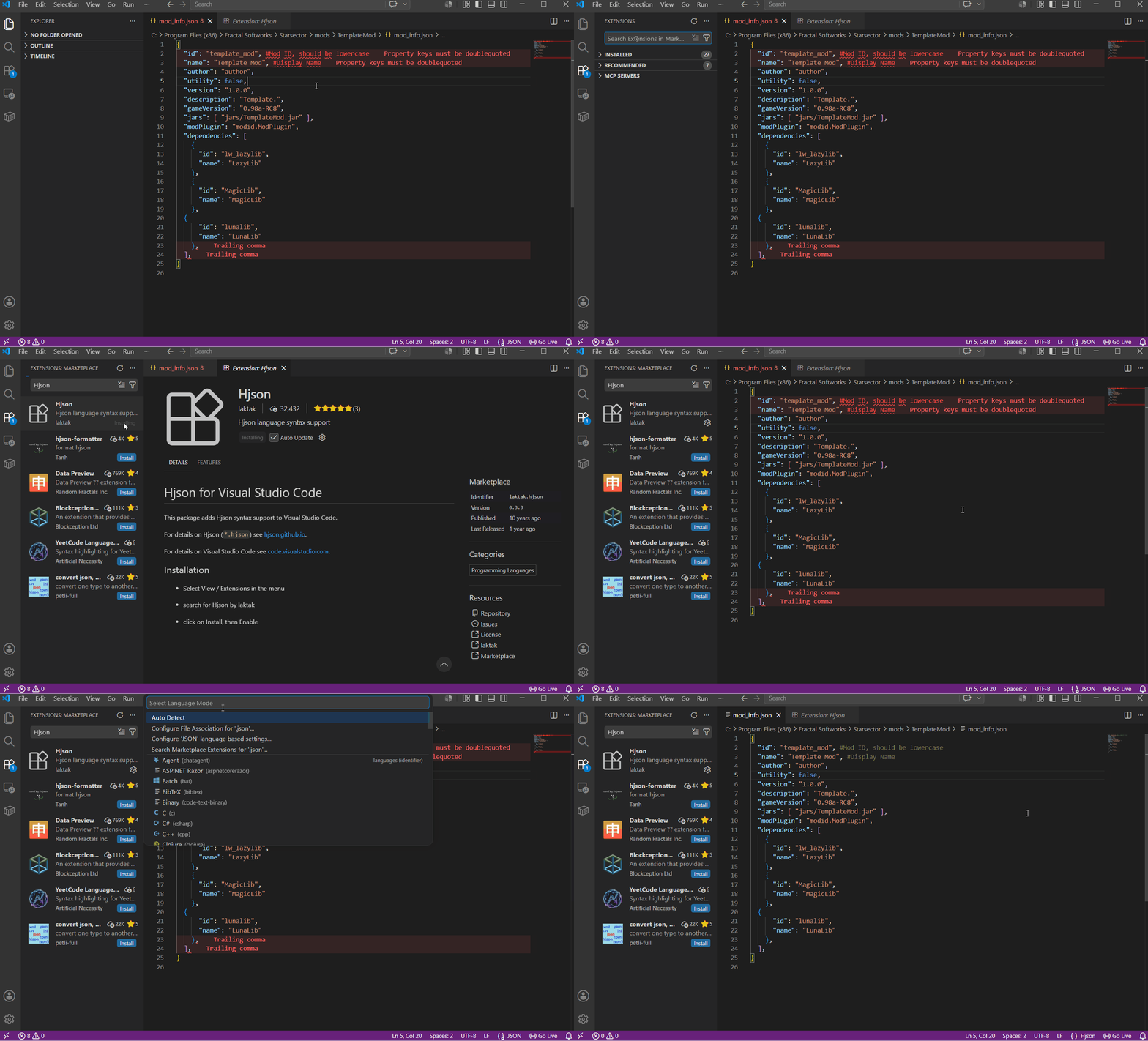
As shown in the video, you can either select the Hjson format per file, or select Configure File Association for .json, which will let you select Hjson as the default for all .json files.
CSV Editor
Starsector uses the .csv file type. This stands for comma-separated-values. It is a type of spreadsheet format, so the data is organised like a table.
These files can technically be opened with text editors, but you should really make use of a more fitting spreadsheet editor for this.
The community's recommendation is Rons Data Edit.
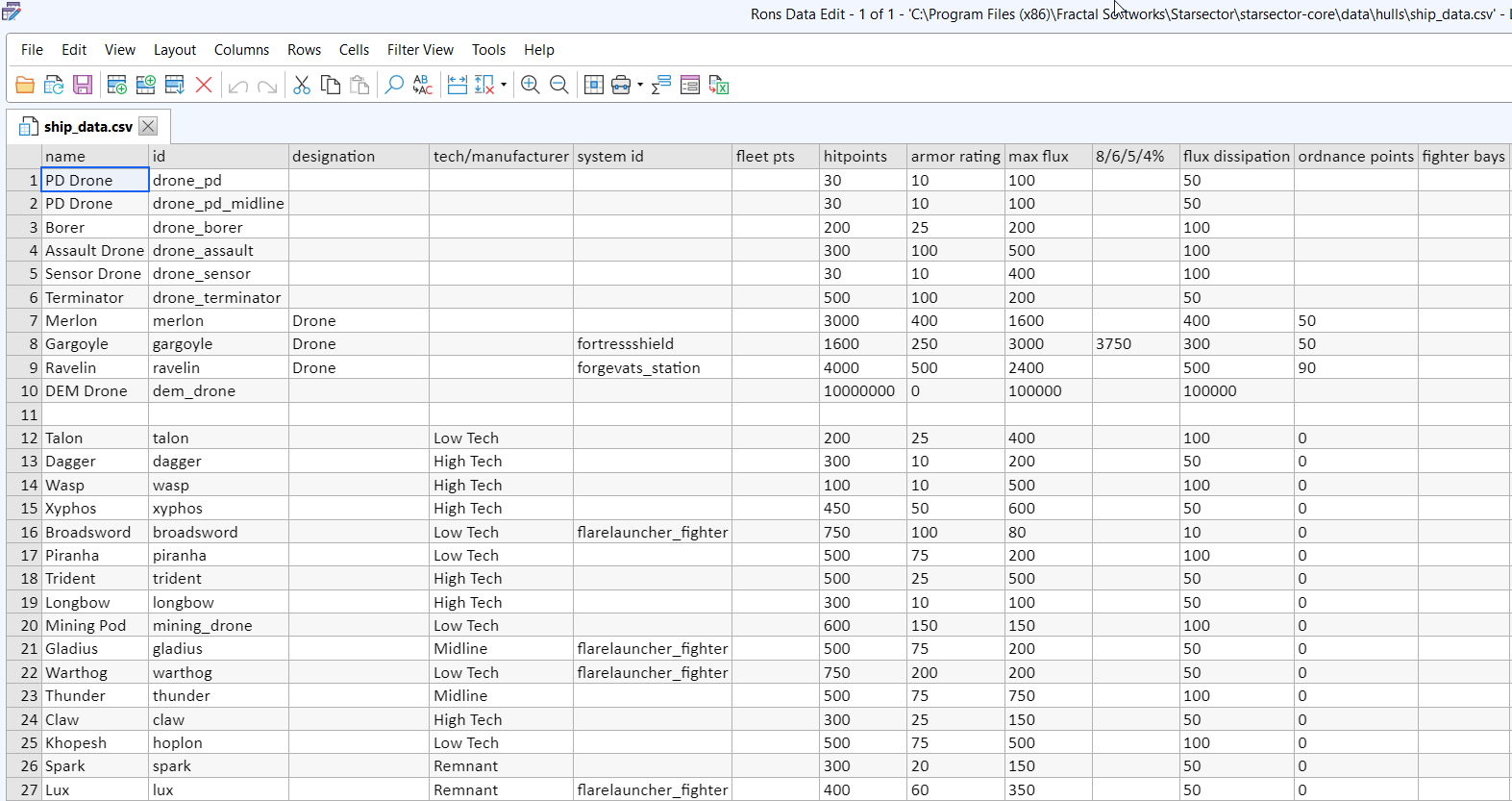
It is advised against using Excel for editing .csv files. Excel will, depending on the localisation it is set to, reformat .csv files to use different characters than a comma for separating values. This leads to Starsector no longer being able to understand the file, essentially breaking the file.
Image Editor
For editing images like .png or .jpg files, you want to have an image editor that supports transparency. There are many options out there, and what you want to grab depends on what you end up doing with them.
Spriting can be done with almost any program supporting transparency, but most popular once include:
- Krita - free and open source image editor. Good for spriting and minor image editing.
- Gimp - free and open source image edtor. Bit hard to get in but also more capable. Good for spriting and minor image editing.
- Paint.net - free image editor. Relatively lightweight and simple. Can be used for image editing and spriting (if you are stubborn enough).
- Clip Studio Paint - paid drawing image editor. Good for spriting and minor image editing.
- Photoshop - paid subscription based image editor. Universally capable in many fields, can be used for spriting and minor image editing.
There’re many other programs out there, some free and some paid. Any of them can be used as long as they support transparency and exporting files in .png or .jpg formats. And remember there is no perfect art tool, and getting to know one software better be more helpful in the long term than switching between many in search of the perfect one. Hone your skills and you will achieve more with any tool.
Besides software, there is also another thing to consider. A Graphic tablet is great and powerful tool. It provides you with finer line control, pressure sensitivity, a faster workflow, and reduced stress for your working hand. Mouse spriting is possible and can yield great results, but working with a tablet and pen is almost always a better and more comfortable creative experience. You don't need to decide right away or get an expensive one, but it is one tool you should consider getting.